Come to 94LIVES website Recharge Mobile Legend: Bang Bang (MLBB for short) users need to provide MLBB User ID and Region ID , but many users don’t know where to check the user ID and area ID of their MLBB. The following is a detailed introduction to how to check the user ID and area ID of their MLBB.
In order to improve the gaming experience, most players will Recharge MLBB diamonds (in-game currency). Players can use diamonds to buy new skins and summon new heroes. However, to recharge MLBB diamonds, users need to provide MLBB user ID and region ID, so that 94LIVES customer service can recharge MLBB diamonds for users in a more timely and accurate manner.
Check out MLBB’s user ID and zone ID process:
Step 1: Open your Mobile Legend: Bang Bang game;
Step 2: Click the avatar in the upper left corner of the home screen;
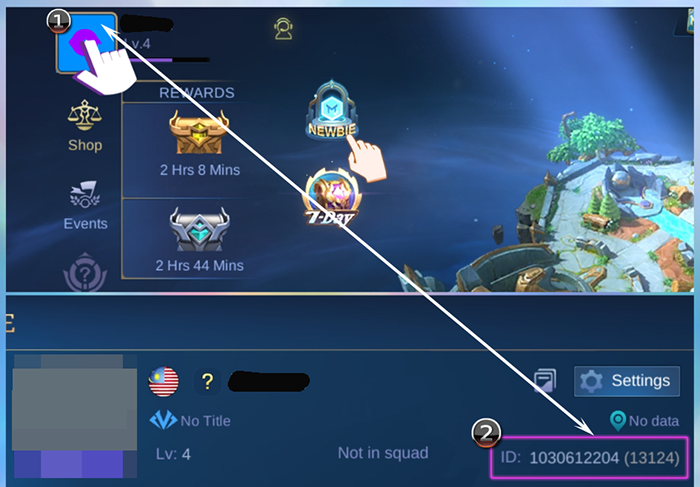
Step 3: Then the User ID and Region ID are located in the upper right corner of your profile.
Notice : The user ID is the longer 1030612204 - the region ID is the number in brackets (13124)
After that, you can fill in the corresponding game ID number when recharging MLBB diamonds on the 94LIVES website. After selecting the payment method and submitting the order to complete the payment, 94LIVES customer service can recharge diamonds for you based on the MLBB user ID and region ID you provided.
Attached is the Mobile Legend: Bang Bang diamond recharge entrance link: https://m.94lives.com/en/Tabs/goodsDetail?categoryId=160