

 售后保障
售后保障
 官方充值
官方充值
 交易安全
交易安全
类型
面值
Product introduction
Product name: YOIO voice
Product type: Voice social platform
Product area service: China area/mainland service
Recharge method: Official website ID direct recharge(Submit your YOIO ID and the system will process it automatically without manual intervention, and the account will arrive within 1 minute)
Recharge ratio: 1 yuan = 100 Ydou
Face value specifications: (optional) 6 yuan/10 yuan/30 yuan/98 yuan/198 yuan/398 yuan, etc. (specifically, please refer to the product page display)
Scope of application: Applicable to the recharge of the Y-bean balance in the YOIO voice account. After recharge, it can be used in all consumption scenarios that support Y-bean on the platform.
YOIO Voice Y Bean Recharge Instructions
1. YOIO voice official direct recharge, submit your ID in YOIO, the system will automatically complete the recharge
2. No manual intervention is required in the entire process. The system automatically handles the payment after payment, and the account is usually received within 1 minute.
3. Before recharging, please make sure the account ID you fill in is consistent with the YOIO account you are currently logged in to.
4. Supports recharging accounts on both iOS (Apple) and Android (Android). Once the recharge is received, it can be used on both ends.
How to recharge YOIO voice beans on 94LIVES? The detailed steps are as follows:
Step One: Visit 94LIVES
Open the browser to visit the 94LIVES official website and enter in the search bar" YOIO voice Y beans"Or directly enter the YOIO voice recharge product page.
Step 2: Select the recharge face value
Choose the corresponding gear according to your needs, for example: 6 Yuan/10 Yuan/30 Yuan/98 Yuan/198 Yuan/398 Yuan etc., the number of Y beans corresponding to the selected gear will be displayed directly on the page.
Step 3: Fill in the recharge information
Fill in your recharge information column YOIO Voice ID(That is, your ID number next to your avatar in YOIO App → Personal Homepage →). Please check the ID number carefully to ensure it is exactly the same as the target account.
Step 4: Select payment method and complete payment
Choose the appropriate payment method and currency according to your region. 94LIVES supports payment in all currencies. The system automatically converts according to the international exchange rate and completes the payment after confirming that the information is correct.
Step 5: Wait for the system to arrive automatically
After the payment is successful, the system will automatically initiate a recharge request to the YOIO Voice official. Usually within 1 minuteYou can see the YOIO balance update in your YOIO account. Open YOIO Voice App → Personal Center to check.
Receiving method
1. This product adopts the official website account ID direct recharge mode. After the payment is successful, the system will automatically process it without manual operation.
2. Normal situation within 1 minute Once the account is received, it can be viewed directly in the YOIO Voice App → Personal Center → Balance
3. If in rare cases there is a delay due to fluctuations in the official interface, the order replenishment will usually be completed automatically within 15 minutes. Please refresh the App balance page to confirm.
YOIO Voice Y Bean Recharge Precautions
Account information verification
Please be sure to double-check whether the YOIO account ID you filled in is correct before submitting. It is recommended to copy and paste the ID number directly and check again digit by digit.
The recharge target is the account corresponding to the filled-in ID. Please make sure it is the YOIO account you are using.
Safety reminder
This recharge portal only requires the public ID of your YOIO account (a number that can be seen by others on your personal homepage) and does not require any login credentials or sensitive information.
Please complete the operation through the formal channel (94LIVES official website) and avoid entering personal information on third-party pages from unknown sources.
Minors' use of this service should be done under the guidance and consent of their guardians.
Exception handling
If the recharge fails to arrive properly due to platform-side reasons, it can be refunded after verification of system records.
If the account ID filled in is incorrect and the account is charged to another account, this situation is not within the scope of the platform's responsibility. Please be sure to check clearly before submitting.
Introduction to YOIO Voice and Y Dou
YOIO voiceIt is a voice social platform that focuses on game hacking and chatting to make friends. It integrates multi-person voice rooms, party rooms, 1v1 voice matching, game teaming and other functions, and is aimed at a large number of game players and social user groups.
Y beansIt is a general billing unit within the YOIO voice platform. After recharging, it can be used for various interactions and consumption within the platform.
The main uses of Y beans
1. Gift giving in the voice room: Purchase gifts in the party hall and voice room to give to hosts and Maishang users to express support and interaction
2. Interesting interactive props: use special effects gifts, entrance effects, floating screens, etc. to enhance the room atmosphere and personal display
3. Identity and decoration: Unlock or renew some decoration and identity display content (depending on account level and activity rules)
4. Participation in platform activities: Some limited-time activities and gameplay require Ydou to sign up, participate or unlock reward qualifications
Platform usage restrictions
Scope of application: Applicable to YOIO Voice official genuine account (global service), no matter you use iOS or Android devices, as long as you log in to the same account, the balance will be shared
Usage restrictions: YDOU can only be used in the consumption scenarios specified in the YOIO voice platform. The specific usable scope is subject to the latest official YOIO rules.
Device compatibility: Supports iOS (Apple) and Android (Android), both ends are compatible after the recharge is received
Frequently Asked Questions (FAQ)
Q1: What should I do if the payment is successful but the Y beans have not arrived yet?
A: Most orders are automatically credited within 1 minute. It is recommended that you wait for a while, then completely close the YOIO Voice App background process and reopen it, and enter the personal center to refresh the balance view. If the payment is still not received after 15 minutes, you can save a screenshot of the successful payment for verification and processing.
Q2: Can I get a refund if my account ID is filled in incorrectly?
A: Please be sure to check the ID bit by bit before submitting. Recharge abnormalities caused by platform-side reasons can be refunded after verification. ; If you fill in an incorrect ID and add it to another account, it cannot be revoked. Please confirm carefully when filling in the form.
Q3: How to find my YOIO account ID?
A: Open the YOIO Voice App → click "My/Personal Center" in the lower right corner → next to the avatar you will see a string of pure numbers, which is your account ID. Long press the ID number to choose to copy it and paste it into the account column on the 94LIVES recharge page.
Q4: Do I need to pay Apple tax when recharging Apple iOS?
A: Recharge Y-Beans through the direct recharge channel of 94LIVES’s official website ID. There is no in-app purchase, so it is not affected by the App Store in-app purchase fee. Both iOS and Android users can obtain the corresponding number of Y-Beans at the same standard ratio.
Q5: Do I need to provide my login account or sensitive information to recharge?
A: No need. This channel only needs to provide your YOIO Public account ID(the number that can be seen by others on your personal homepage), no login credentials, SMS verification code or other sensitive information is required. Please do not disclose your login information on any third-party channels.
Q6: Are iOS and Android recharges using the same account?
A: Yes. As long as you log in to the same YOIO account (same account ID) on iOS and Android devices, the YOIO balance is shared with each other and can be seen by logging in on any device after the recharge is received.
What payment methods does 94LIVES support?
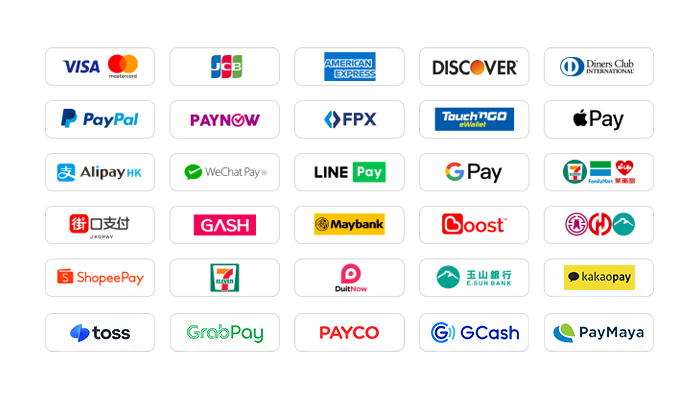
94LIVES is very friendly to Taiwanese users and covers almost all local mainstream non-cash payment methods:
Local payment methods in Taiwan
1. Credit card/debit card: supports credit cards or debit cards issued by global card groups such as Visa, Mastercard, JCB, etc.
2. PayPal: A global third-party payment platform that supports PayPal wallet and PayPal card payments.
3. Apple Pay/Google Pay: Supports fast biometric payments through mobile wallets
4. Gash member wallet: supports the Gash wallet commonly used by local players in Taiwan
5. Jiekou Payment (JKOPAY): Taiwan’s most popular scan-code payment tool
6. LINE Pay: supports authentication-free and extremely fast payment
7. Supermarket barcode/code: Support collection and payment through convenience stores such as 7-11, FAMIPORT, Life-ET, etc.
Global payment methods
1. International credit card/stored-value card: supports Visa, Mastercard, American Express (AMEX), Discover and other card groups worldwide
2. PayPal: A global third-party payment platform that supports PayPal wallet and PayPal card payments.
3. Apple Pay/Google Pay: Supports fast biometric payments through mobile wallets
4. Local payment in Hong Kong: Supports AlipayHK and WeChat Pay HK, and can directly use mobile payment to complete convenient payments.
5. Local payment in Malaysia: Touch 'n Go, FPX, DuitNow, ShopeePay, etc.
6. Local payment in Singapore: PayNow, supports major banks in Singapore
7. Local in other countries: Support South Korea (KaKaoPay, Toss), Thailand (TrueMoney, LINE Pay, ShopeePay), Cambodia, Pakistan (Easypaisa, JAZZCASH), etc.
What currencies does 94LIVES support?
94LIVES supports more than 220 countries and regions around the world. Product display prices are based on US dollars and supports multiple mainstream currencies:
Major currencies: US dollar (USD), Australian dollar (AUD), euro (EUR), British pound (GBP), Canadian dollar (CAD)
Asian currencies: Hong Kong dollar (HKD), Malaysian ringgit (MYR), New Taiwan dollar (TWD), Singapore dollar (SGD)
Automatic exchange rate conversion: The exchange rate is automatically adjusted according to the international exchange rate during the transaction, and the system automatically converts it into US dollars or local currency for payment.
Coverage area
94LIVES services cover major countries and regions around the world, including:
Americas: United States, Canada, Brazil
Europe: United Kingdom, Germany, France, Italy, Netherlands, Switzerland, Denmark, Ireland
Asia Pacific: Australia, Japan, South Korea, Singapore, Malaysia, New Zealand
Other regions: South Africa, etc.
After-sale guarantee
Automated recharge guarantee: The entire system is directly connected to the official interface without manual intervention, reducing human errors.
Processing time: After successful payment, the payment is usually received within 1 minute. In rare cases where the official interface fluctuates, the order will be automatically replenished within 15 minutes.
Verification mechanism: Each order has a system flow record. If the recharge is abnormal due to platform-side reasons, it can be refunded after verification.

 Anonymous User
Anonymous User
Anonymous User
Anonymous User
Anonymous User







RM 5020, 5/F, YAU LEE CENTRE, NO.45, HOI YUEN ROAD, KWUN TONG, HONG KONG
$ 32.66