


 售后保障
售后保障
 官方充值
官方充值
 交易安全
交易安全
类型
面值
Product introduction
Product name: Yalla Pay Gift Card
Product Type: Voice/Social
Product area service: global service
Recharge method: Card secret
Scope of application:
Buy Yalla Pay Gift Card Available for recharge Yalla Golds、 Yalla Ludo Diamonds and Yalla Ludo Golds;
Recharge instructions:
Yalla Pay Gift Card It is a card-protected product. After payment, go to the order details to view it. Gift Card PIN Code(12-digit), manual one-on-one service, 24-hour customer service online processing orders.
IMPORTANT NOTE:
Yalla Pay Gift Card sold by 94LIVES cannot be used in Saudi Arabia, United Arab Emirates, Bahrain, Oman, Morocco, Tunisia, Algeria, Palestine and Jordan.
Yalla Pay Gift Card purchase process:
1. Open Yalla Pay Gift Card Product purchase page;
2. Select face value and quantity;
3. Click the Buy Now button;
4. Submit the order after selecting the payment method;
5. Complete payment;
6. Contact online customer service to send it to you Gift Card PIN Code(12-digit)。
How to top up Yalla Golds using Yalla Pay Gift Card?
1. Open the Yalla Pay official website link: https://www.yallapay.live/recharge?fAppType=10;
2. Fill in Yalla User ID;
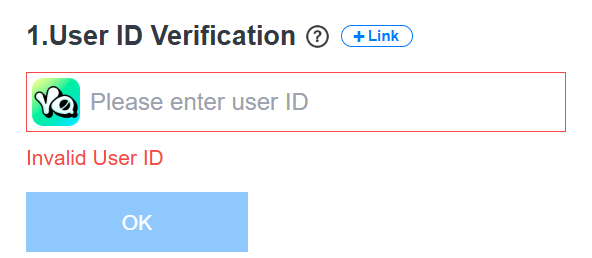
3. Select payment method“ Gift Card”;
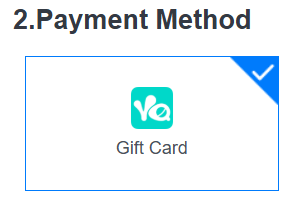
4. Select the one corresponding to the face value Golds;
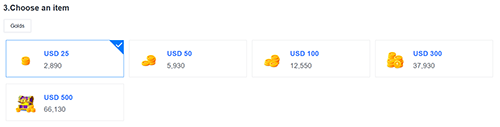
5. Fill in Gift Card PIN Code(12-digit);
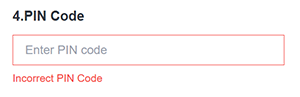
6. Click the “Pay Now” button;
7. After the payment is completed, Golds can be recharged to your Yalla account.
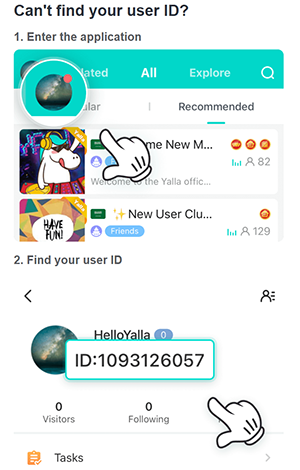
How to find Yalla User ID?
How to top up Yalla Ludo Diamonds and Yalla Ludo Golds using Yalla Pay Gift Card?
1. Open Yalla Ludo top upOfficial website link: https://www.yallapay.live/recharge?fAppType=20;
2. Fill in Yalla Ludo User ID;
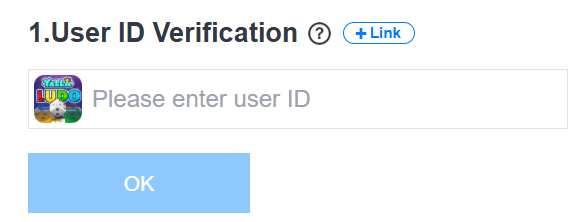
3. Select payment method“ Gift Card”;
4. Select the one corresponding to the face value Diamonds or Golds;
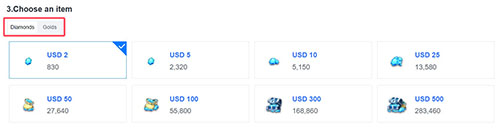
5. Fill in Gift Card PIN Code(12-digit);
6. Click the “Pay Now” button;
7. After the payment is completed, Diamonds or Golds can be recharged into your Yalla Ludo account.
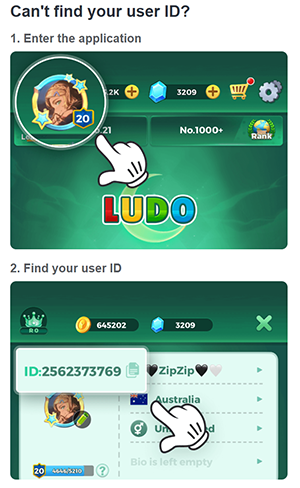
How to find Yalla Ludo User ID?

 Anonymous User
Anonymous User
Anonymous User
Anonymous User
Anonymous User









RM 5020, 5/F, YAU LEE CENTRE, NO.45, HOI YUEN ROAD, KWUN TONG, HONG KONG
$ 579.66