


 Sales Guarantee
 Secure Assurance
 Borderless Access
Type
Value
Product introduction
Product name: canvas drawable team version
Product type: Member/VIP service
Recharge type: Team version
Recharge method: Canva can draw official recharge (contact customer service after payment)
Note: This product is a basic team version and supports up to 3 people.
Team Edition Recharge Instructions
1. This product is a Canva team version service. After activation, you can enjoy team collaboration and advanced design functions.;
2. Both Apple iOS users and Android users can purchase through 94LIVES and enjoy the same price.;
3. After placing the order and paying, please contact online customer service, who will assist you in activating the team version.
How to open the Canva drawable team version on 94LIVES? The detailed steps are as follows:
Step One: Visit 94LIVES
Open the browser to visit the 94LIVES official website, enter "canva drawable team version" in the search bar or directly enter the relevant product page.
Step 2: Choose the team version package
94LIVES provides Canva team version package (the specific package is subject to the page display).
Step 3: Fill in purchase information
Enter your Canva drawable account (usually a bound email or mobile phone number) and confirm that the account is accurate.
Important note: Please check the account information carefully. The team version activation is completed through the official channel to prevent activation failure due to account errors.
Step 4: Select payment method and complete payment
Choose the appropriate currency and payment method according to your region. 94LIVES supports payment in all currencies. The system automatically converts according to the international exchange rate. After the payment is completed, the order enters the processing process.
Step 5: Contact customer service to complete activation
After the payment is successful, please contact 94LIVES online customer service and provide your order number and account information. The customer service will handle it for you. Team version permissions usually take effect within 1-5 minutes.
Receiving method
1. Contact customer service after successful payment. Team version permissions usually take effect within 1-5 minutes.;
2. Customer service will prioritize paid orders to ensure quick activation;
3. If there is a large number of orders and the activation is delayed, please contact online customer service to handle it for you first.
Things to note when purchasing the team version
Account security and risk tips
Account information protection: All official purchase channels will not ask for non-essential information. If you encounter such a request, please stop operating immediately.;
Please purchase the team version through formal channels to ensure account security.;
Before purchasing, please confirm that the account can be logged in normally to avoid affecting the activation of the team version.
Information verification and error handling
Information accuracy: Carefully check the account information to avoid failure to activate the team version due to filling errors.;
Error handling mechanism: If the activation error is caused by the 94LIVES platform, it can be refunded after verification.;
Effective time: It usually takes effect within 1-5 minutes after contacting customer service. If there is a delay, you can contact customer service again.
Introduction to Canva Drawable and Team Edition
Canva can be drawnIt is an online design platform that provides a large number of templates, pictures, fonts and other materials to make design simple and efficient.
Team EditionBased on the advanced version, team collaboration functions are added, including shared template library, brand toolbox, team management permissions, etc. This product is a basic team version and can be used by up to 3 people.
Main uses of Team Edition
1. Team members share design templates and brand materials;
2. Create team folders and manage design assets in a unified manner;
3. Set team permissions and assign appropriate design tasks;
4. Enjoy all the design resources and smart tools of the premium version.
Platform usage restrictions
Scope of application: This team version is suitable for the entire Canva platform (does not distinguish between domestic and foreign);
Usage restrictions: Team version permissions are only available to purchased accounts and invited team members, supporting up to 3 people.;
Device compatibility: Supports Apple system (iOS) and Android system (Android).
Frequently Asked Questions (FAQ)
Q1: What should I do if the team version does not take effect after purchasing?
A: Please confirm that you have contacted online customer service and provided the order number. If you have contacted but still does not take effect, you can contact customer service again.
Q2: Can I get a refund if I fill in the wrong account number?
A: If there is an error in activation due to platform reasons, the refund can be processed after passing the verification. Please be sure to check the account number carefully to avoid failure to activate the team version due to filling errors.
Q3: Is there any price difference between Apple users and Android users?
A: When purchasing through 94LIVES, all users enjoy the same price without any additional fees.
Q4: What safety matters need to be paid attention to during the purchase process?
A: Make sure to operate in a safe network environment, confirm the account number twice before payment, and keep screenshots of transaction vouchers for inquiry.
Q5: How is the pricing of the team version of 94LIVES determined?
A: The pricing of products on the 94LIVES platform follows market principles. The final sales price is composed of product cost, platform service fees, payment channel fees, taxes, etc. The pricing is transparent and reasonable.
Q6: Can more members be added to the team version?
A: This product is a basic team version, supporting up to 3 people. If you need more members, please contact customer service to upgrade your package.
What payment methods does 94LIVES support?
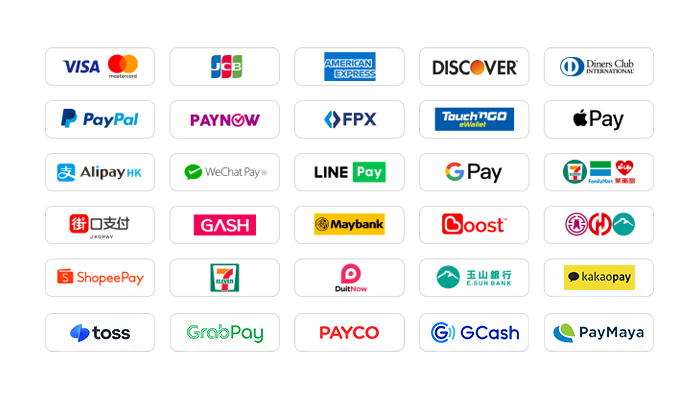
94LIVES is very friendly to Taiwanese users and covers almost all local mainstream non-cash payment methods:
Local payment methods in Taiwan
1. Credit card/debit card: Supports credit cards or debit cards issued by global card groups such as Visa, Mastercard, and JCB.
2. PayPal: A global third-party payment platform that supports PayPal wallet and PayPal card payments.
3. Apple Pay/Google Pay: Supports fast biometric payments through mobile wallets.
4. Gash member wallet: supports the Gash wallet commonly used by local game players in Taiwan.
5. Jiekou Payment (JKOPAY): Taiwan’s most popular scan-code payment tool, you can now enjoy a 20% discount on website activity fees for a limited time.
6. LINE Pay: The current website supports fast payment without authentication, and you can enjoy a 50% discount on the handling fee for a limited time.
7. Supermarket barcode: Support collection and payment through convenience stores such as 7-11, FAMIPORT, and Life-ET.
8. Supermarket code: The current website supports authentication-free and fast payment, and supports collection and payment at the four major convenience stores in Taiwan.
9. Bank transfer and Yushan Bank: Supports all bank debit cards in Taiwan, and allows direct transfer and payment in New Taiwan Dollars through physical ATMs, online banking or mobile banking.
Global payment methods
1. International credit cards/stored-value cards: supports credit cards or debit cards issued by Visa, Mastercard, American Express (AMEX), Dinner, Discover and other card groups around the world.
2. PayPal: A global third-party payment platform that supports PayPal wallet and PayPal card payments.
3. Apple Pay/Google Pay: Supports fast biometric payments through mobile wallets.
4. Local payment in Hong Kong: Supports AlipayHK and WeChat Pay HK, and can directly use mobile payment to complete a convenient payment experience.
5. Local payment in Malaysia: Touch 'n Go, FPX, DuitNow, ShopeePay, etc. TNG on the current website can enjoy a limited-time 30% discount on handling fees.
6. Local payment in Singapore: Paynow supports major banks in Singapore, and now enjoys a 30% discount on website activity fees for a limited time.
7. Local payment in Taiwan: Supports local mainstream wallet payments such as JKOPAY, LINEPAY, supermarkets, bank transfers, etc., and some payment methods have limited-time discounts on handling fees.
8. Local in other countries: Support South Korea (KaKaoPay, Toss, PayCo), Cambodia, Thailand (TrueMoney, LINEPAY, ShopeePay), Pakistan (Easypaisa, JAZZCASH), etc.
The website will add/update payment methods in real time to support local payments in more countries.
What currencies does 94LIVES support?
94LIVES supports more than 220 countries and regions around the world. Product display prices are mainly in US dollars, and it also supports multiple mainstream currencies:
Major currencies: US dollar (USD), Australian dollar (AUD), euro (EUR), British pound (GBP), Canadian dollar (CAD);
Asian currencies: Hong Kong dollar (HKD), Malaysian ringgit (MYR), New Taiwan dollar (TWD), Singapore dollar (SGD);
Automatic exchange rate conversion: The exchange rate is automatically adjusted according to the international exchange rate during the transaction, and the system automatically converts it into US dollars or local currency for payment.
Coverage area
94LIVES services cover major countries and regions around the world, including:
Americas: United States, Canada, Brazil
Europe: United Kingdom, Germany, France, Italy, Netherlands, Switzerland, Denmark, Ireland
Asia Pacific: Australia, Japan, South Korea, Singapore, Malaysia, New Zealand
Other regions: South Africa, etc.
Customer service and support
7x24-hour online customer service: Answer users’ questions around the clock, and handle payment and team version activation issues.
After-sales guarantee: A complete after-sales service system ensures users’ team version purchasing experience.
Processing time: Team version permissions usually take effect within 1-5 minutes after contacting customer service.
By purchasing the canvas team version through 94LIVES, users can not only enjoy a convenient payment experience, but also avoid exchange rate losses and payment obstacles. The platform's professional services and multiple guarantee mechanisms ensure that users can complete the team version activation safely and efficiently, focusing on team collaboration and efficient design.

 Anonymous User
Anonymous User
Anonymous User
Anonymous User
Anonymous User









RM 5020, 5/F, YAU LEE CENTRE, NO.45, HOI YUEN ROAD, KWUN TONG, HONG KONG
$ 81.55