


 Sales Guarantee
 Secure Assurance
 Borderless Access
Type
Value
Product introduction
Product Name: Youku Video Membership Service (VIP/SVIP)
Product type: Video membership service
Product area service: domestic version
Recharge method: official direct recharge (contact customer service after payment)
Youku Video Membership Service Activation Instructions
Service type: This product is the official service of "VIP Member" and "SVIP Super Member" of the domestic version of "Youku Video".
Service specifications: Provides monthly, quarterly, annual and other duration options, covering two membership levels: VIP and SVIP.
Recharge process: This product is an official direct recharge service. After payment, you need to contact online customer service as soon as possible and provide your order number. Customer service will guide you to complete the subsequent operations.
Scope of application: Only applicable to domestic version of Youku Video VIP members/SVIP members recharge.
How to activate Youku video membership on 94LIVES? The detailed steps are as follows:
Step 1: Visit 94LIVES and select products
Visit the 94LIVES official website, search for "Youku Video Membership", and select the membership type (VIP or SVIP) and duration (month, quarter, year) you need.
Step 2: Complete payment
Choose the appropriate currency and payment method according to your region. 94LIVES supports payment in all currencies, and the system automatically converts according to the international exchange rate to complete the payment.
Step 3: Contact customer service (key step)
After successful payment, please be sure to contact 94LIVES online customer service immediately and provide your order number. Customer service will guide you through the subsequent operations and activate your membership.
Step 4: Confirm membership is valid
After the customer service processing is completed, membership is usually activated within 1-5 minutes. Please log in to the Youku video client later and check the membership ID and validity period on the "My" page.
Receipt method:
This product is a virtual membership service and you will not receive a physical card code after purchase.
After payment and contacting customer service, we will process your order as soon as possible, and it usually takes effect within 1-5 minutes.
If there are many orders on the website and the processing is delayed, please contact online customer service directly and we will give priority to you.
Things to note when registering as a member of Youku Video
Safety and Process Tips
Official customer service guidelines: 94LIVES customer service will only ask for your order number to verify the order and guide you through subsequent operations. Customer service will not proactively ask for sensitive information such as your account password, verification code, etc. Please contact customer service through the platform’s official chat window.
Information accuracy: Please ensure that the order number provided when contacting customer service is accurate. Activation problems caused by incorrect order information will not be transferred or refunded.
Avoid login conflicts: To ensure a smooth activation process, it is recommended that you temporarily avoid logging in to your Youku account until the processing is completed.
Protection of minors: Minor users should make purchases under the guidance of their guardians.
Error handling mechanism
User Responsibility: If we have completed the activation according to the order information and subsequent operations you provided, refunds will not be made.
Platform responsibility: If the activation fails or is incorrect due to the 94LIVES platform, we will arrange a refund or re-activation for you after verification.
About "Youku Video" and membership services
YOUKU.com is China's leading video website. It takes "the fast is king" as its product concept, focuses on user experience, and relies on the product features of "fast playback, fast publishing, and fast search" to meet the diverse interactive needs of users. It is a leading brand in the domestic online video industry.
By signing up as a Youku member, you can enjoy multiple privileges such as ad-free viewing of massive high-quality film and television content, member-only film library, Blu-ray 1080P/4K image quality, early viewing, etc., which greatly enhances the movie-watching experience.
Member privilege details
VIP member (Youku VIP):
Content privileges: Free viewing of members’ exclusive film library, covering movies, TV series, variety shows, animations, etc.
Watching experience: Eliminate pre-roll ads and enjoy Blu-ray 1080P picture quality.
Other rights and interests: sneak preview of some content, exclusive identification, etc.
SVIP super member (Youku SVIP):
Includes all VIP membership benefits.
Enhanced experience: On the basis of VIP rights, you can enjoy a higher-standard audio-visual experience, such as clearer picture quality, Dolby audio-visual, etc. (specifically, please refer to Youku’s official real-time rights).
Multi-terminal benefits: You may enjoy additional benefits on TV terminals, viewing on more devices at the same time, etc.
Platform usage restrictions
Scope of application: This service is only applicable to the domestic version of Youku Video, and is not applicable to the international version of Youku or other regional versions.
Usage restrictions: Once the membership service is activated, refunds are not supported. Membership rights are only available within the validity period. The specific rights and interests are subject to Youku’s official real-time announcement.
Device compatibility: Supports mobile APP, PC web pages, TV and other devices, but there may be restrictions on the number of playback devices at the same time.
Frequently Asked Questions (FAQ)
Q1: What should I do if the membership does not take effect after activation?
A: Please confirm that you have completed the payment and contact customer service to provide the order number. Then check the network, log out of Youku APP and log in again to view the "My" page. If it does not take effect after 5 minutes, please provide the order number and contact 94LIVES online customer service for enquiry.
Q2: What is the difference between VIP and SVIP? Can they be activated at the same time?
A: SVIP includes all VIP rights, and may enjoy higher-level picture quality (such as Frameshare Video, Dolby) and multi-end rights. The relationship between the two is an upgrade. After activating SVIP, you will enjoy the current highest level of rights and interests. There is no need to and cannot activate VIP at the same time.
Q3: After becoming a member, can I use it on mobile phones, computers, and TVs at the same time?
A: Youku members usually support multiple logins, but there may be restrictions on the number of playback devices at the same time (for example, only 1-2 devices can play at the same time). SVIP may have more authority in this regard. Please refer to Youku’s official membership agreement for specific rules.
Q4: Can members be added to the subscription?
A: Under normal circumstances, Youku membership duration can be stacked. For example, if you activate it again on the basis of existing membership, the validity period will be extended accordingly. However, it is recommended that you refer to Youku’s official instructions for the specific rules for superimposing members of the same level.
What payment methods does 94LIVES support?
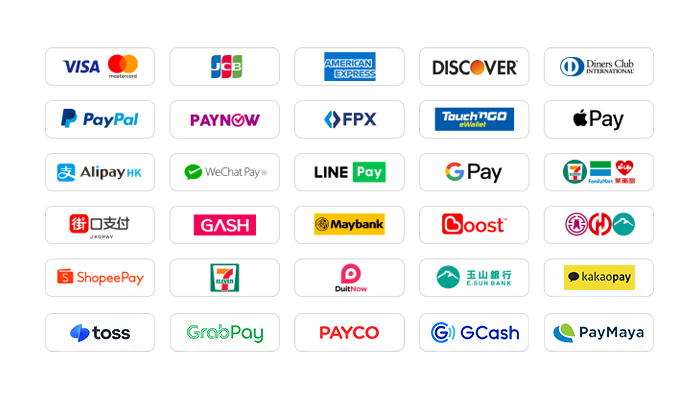
94LIVES is very friendly to Taiwanese users and covers almost all local mainstream non-cash payment methods:
Local payment methods in Taiwan
Credit card/debit card: Supports credit cards or debit cards issued by global card groups such as Visa, Mastercard, and JCB.
PayPal: A global third-party payment platform that supports PayPal wallet and PayPal card payments.
Apple Pay/Google Pay: Supports fast biometric payments through mobile wallets.
Jiekou Payment (JKOPAY): Taiwan’s most popular QR code payment tool.
LINE Pay: supports authentication-free and extremely fast payment.
Supermarket payment: Support collection and payment through convenience stores such as 7-11 and FamilyMart.
Bank transfer: Support bank transfer in Taiwan and Yushan Bank payment.
Global payment methods
International credit cards/stored-value cards: Supports global Visa, Mastercard, American Express (AMEX) and other card groups.
PayPal: a globally accepted third-party payment platform.
Apple Pay/Google Pay: Supports quick payments through mobile wallets.
Electronic wallets from various places: Support Hong Kong AlipayHK, WeChat Pay HK; Malaysia Touch 'n Go, Boost ; Thailand TrueMoney and many other regional wallets.
Online banking transfer: Supports online transfers from local banks in multiple countries.
The website will add/update payment methods in real time to support local payments in more countries.
What currencies does 94LIVES support?
94LIVES supports more than 220 countries and regions around the world. Product display prices are mainly in US dollars, and it also supports multiple mainstream currencies:
Major currencies: US dollar (USD), Australian dollar (AUD), euro (EUR), British pound (GBP), Canadian dollar (CAD).
Asian currencies: Hong Kong dollar (HKD), Malaysian ringgit (MYR), New Taiwan dollar (TWD), Singapore dollar (SGD).
Automatic exchange rate conversion: The exchange rate is automatically adjusted according to the international exchange rate during the transaction, and the system automatically converts it into US dollars or local currency for payment.
Coverage area
94LIVES services cover major countries and regions around the world, including:
Americas: United States, Canada, Brazil
Europe: United Kingdom, Germany, France, Italy, Netherlands, Switzerland
Asia Pacific: Australia, Japan, South Korea, Singapore, Malaysia
Customer service and support
7x24-hour customer service: 24/7 online customer service is available to answer users’ questions and handle payment and recharge issues.
After-sales guarantee: A complete after-sales service system ensures user recharge experience.
Processing time: After payment and successful contact with customer service, the order will usually be processed within 1-5 minutes.
By signing up as a "Youku Video" member through 94LIVES, you can enjoy convenient global payments, transparent exchange rate conversions and professional customer service support. Whether you choose a flexible monthly pass, an affordable quarterly pass, or a value-for-money annual pass, VIP or SVIP, you can enjoy ad-free viewing of massive high-definition film and television content and experience the ultimate audio-visual feast.

 Anonymous User
Anonymous User
Anonymous User
Anonymous User
Anonymous User









RM 5020, 5/F, YAU LEE CENTRE, NO.45, HOI YUEN ROAD, KWUN TONG, HONG KONG
$ 12.71