


 售后保障
售后保障
 官方充值
官方充值
 交易安全
交易安全
类型
面值
Product introduction
Product Name: Miru Game Box Cloud Hang-up
Product type: Game auxiliary services
Product area service: official full platform
Recharge method: Direct recharge through official website account
Service duration: 1 day, 7 days, 30 days, 90 days, 180 days
Scope of application: Applicable to games on the Miru Game Box platform that support the cloud idle function.
Mulu Game Box Cloud Hang-up Recharge Instructions
After the product payment is successful, the cloud hang-up service is usually activated to your Mulu Game Box account within 1 minute.
After the cloud idle service is activated, you can use the cloud idle function in supported games, and you can play games without keeping your device online.
The cloud hang-up service is calculated on a calendar day basis, and the service duration begins after purchase.
The same account can purchase multiple cloud on-hook services at the same time, and the service time will be accumulated.
If you encounter any problems, you can contact 94LIVES online customer service for help at any time.
Operation steps
Step One: Visit 94LIVES
Open the browser to visit the 94LIVES official website, enter "Miru Game Box Cloud Hang-up" in the search bar or directly enter the relevant product page.
Step 2: Choose the service length
94LIVES provides a variety of cloud idle service durations for you to choose from, such as 1 day, 7 days, 30 days, 90 days, 180 days, etc.
Step 3: Fill in the recharge information
On the order page, accurately enter your Miru Game Box account information.
Important note: Please do not log in to Miru Game Box or do any other operations that may affect the activation status before the order is processed.
Step 4: Select payment method and complete payment
Depending on your region, choose the appropriate currency and payment method to pay. 94LIVES supports a variety of local and global payment methods.
Step 5: Confirm cloud on-hook activation
After successful payment, the cloud hang-up service will usually be activated to your Mulu Game Box account within 1 minute. Please log in to your account to use the cloud AFK function in relevant games.
Receiving method
This product is a digital service. After successful purchase, it will be directly activated to your designated Mulu Game Box account.
After your payment is successful, the system will process it as soon as possible, and usually the service activation can be completed within 1 minute.
After successful activation, you can log in to your Miru Game Box account to view and use this feature in games that support cloud idle.
Things to note
Security and information verification
Please ensure that you operate in a safe network environment and keep your personal account information safe.
Please carefully check the Mulu Game Box account you filled in. If activation fails due to filling errors, you need to recheck the information.
If there is an activation error due to the 94LIVES platform, we will handle it for you after verification.
Please note that according to the relevant terms of service, minors should use this service under the guidance and consent of their guardians.
The cloud idle service only supports games that have enabled this function on the Miru Game Box platform. The specific supported games are subject to the platform announcement.
The duration of the cloud idle service is calculated based on natural days. The calculation starts after purchase and does not support suspension.
Product introduction
Miru Game Box cloud AFK is a cloud game AFK service provided by the Miru platform. After purchasing, users can use the cloud AFK function in supported games. They can automatically perform game tasks and AFK without keeping the device online, saving device power and network resources and improving game efficiency.
Main purpose
Cloud automatic hang-up: No need to keep the device online, the cloud server automatically hangs up your game character.
Save device resources: Reduce device power consumption and network traffic, and extend device service life.
24 hours uninterrupted: The cloud server runs 24 hours a day to achieve uninterrupted game hangup.
Multi-tasking parallelism: It can provide cloud idle services for multiple supported games at the same time.
Improve game progress: Automatically complete daily tasks and resource collection without manual operations, speeding up game progress.
Platform restrictions
This cloud idle service is only applicable to games that have enabled the cloud idle function on the Miru Game Box platform.
Different games may have different levels of support and functions for cloud AFK, and the details are subject to the actual situation in each game.
This service supports use on iOS and Android devices through the official application of Miru Game Box.
The cloud idle service is calculated based on natural days and starts immediately after purchase. Suspension or extension is not supported.
The same account can purchase multiple cloud on-hook services at the same time, and the service duration will be accumulated, but the maximum will not exceed 365 days.
FAQ
Q1: What should I do if the service is not activated after purchasing the cloud hangup?
A: Please check the network connection first, then log in to Miru Game Box again and check the cloud idle service status. If it still shows that it is not activated, you can contact 94LIVES online customer service for help.
Q2: What should I do if I fill in the wrong recharge account number?
A: Please check the recharge account information carefully. If there is an activation error due to the 94LIVES platform, we will handle it for you after verification.
Q3: What games does cloud hangup support?
A: The cloud idle service only supports games that have enabled this function on the Miru Game Box platform. The specific list of supported games can be viewed in the Miru Game Box APP.
Q4: Can the cloud hangup service be suspended?
A: The cloud on-hook service is calculated continuously on a calendar day basis. The service duration is calculated immediately after purchase and does not support suspension.
Q5: How to check the remaining time of cloud hangup?
A: Log in to the Miru Game Box APP and enter the personal center or cloud idle function page to check the remaining service time.
Q6: Will the game character gain experience during the cloud idle period?
A: The cloud AFK service will simulate normal AFK behavior. The specific experience, props, etc. obtained are subject to the actual settings in the game.
Payment method
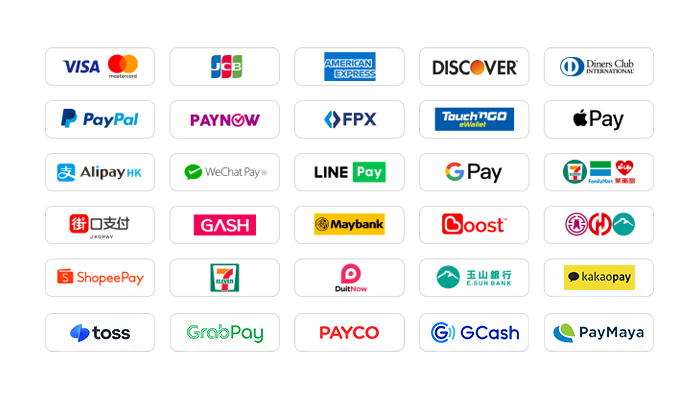
94LIVES supports a variety of payment methods to meet the payment needs of global users:
Local payment methods in Taiwan
Credit card/debit card: Supports credit cards or debit cards issued by global card groups such as Visa, Mastercard, and JCB.
PayPal: A global third-party payment platform that supports PayPal wallet and PayPal card payments.
Apple Pay/Google Pay: Supports fast biometric payments through mobile wallets.
Gash member wallet: Supports the Gash wallet commonly used by local gamers in Taiwan.
Jiekou Payment (JKOPAY): Taiwan’s most popular QR code payment tool.
LINE Pay: supports authentication-free and extremely fast payment.
Supermarket barcode/code: Support collection and payment through convenience stores such as 7-11, FAMIPORT, Life-ET, etc.
Bank transfer and Yushan Bank: Supports debit cards from all banks in Taiwan, and transfers payment through physical ATMs, online banking or mobile banking.
Global payment methods
International credit cards/stored-value cards: Support credit cards or debit cards issued by Visa, Mastercard, American Express (AMEX) and other card groups around the world.
PayPal: A global third-party payment platform that supports PayPal wallet and PayPal card payments.
Apple Pay/Google Pay: Supports fast biometric payments through mobile wallets.
Hong Kong local payment: AlipayHK and WeChat Pay HK are supported.
Local payments in Malaysia: Touch 'n Go, FPX, DuitNow, ShopeePay, etc.
Local payments in Singapore: Paynow supports major banks in Singapore.
Local payment in other countries: Supports multiple regional payment methods such as South Korea (KaKaoPay, Toss), Thailand (TrueMoney, LINEPAY), etc.
Supported currencies
94LIVES supports payment in multiple mainstream currencies around the world:
Major currencies: US dollar (USD), Australian dollar (AUD), euro (EUR), British pound (GBP), Canadian dollar (CAD).
Asian currencies: Hong Kong dollar (HKD), Malaysian ringgit (MYR), New Taiwan dollar (TWD), Singapore dollar (SGD).
Automatic exchange rate conversion: The exchange rate is automatically adjusted according to the international exchange rate during the transaction, and the system automatically converts it into US dollars or local currency for payment.
Coverage area
94LIVES services cover major countries and regions around the world, including:
Americas: United States, Canada, Brazil
Europe: United Kingdom, Germany, France, Italy, Netherlands, Switzerland, Denmark, Ireland
Asia Pacific: Australia, Japan, South Korea, Singapore, Malaysia, New Zealand
Other regions: South Africa, etc.
Customer service support
7x24-hour customer service: 24/7 online customer service is available to answer users’ questions and handle payment and activation issues.
After-sales guarantee: A complete after-sales service system ensures user purchasing experience.
Processing time: The product is usually activated within 1 minute after successful payment. If there is a delay, please contact customer service for enquiry.

 Anonymous User
Anonymous User
Anonymous User
Anonymous User
Anonymous User









RM 5020, 5/F, YAU LEE CENTRE, NO.45, HOI YUEN ROAD, KWUN TONG, HONG KONG
$ 1.63