


 Sales Guarantee
 Secure Assurance
 Borderless Access
Type
Value
Product Introduction
Product Name:Fortnite
Product Type:International Server Game
Server/Region:Global Version
Recharge Method:Official Top-Up (Contact Customer Service After Payment)
How to Recharge Fortnite on 94LIVES
Step 1: Visit 94LIVES
Open your browser and go to the official 94LIVES website. Search for "Fortnite" or navigate directly to the relevant product page;
Step 2: Select Recharge Product
Select "V-Bucks" on the product page and choose the desired quantity option;
Step 3: Fill in Recharge Information
Enter your recharge information and confirm the details are correct;
Important: Please carefully verify your recharge information to avoid errors that may cause recharge failure.
Step 4: Select Payment Method and Complete Payment
Choose a suitable currency and payment method based on your region. 94LIVES supports multi-currency payments with automatic international exchange rate conversion. After completion, your order enters the processing flow;
Step 5: Confirm Recharge Receipt
After a successful payment, contact online customer service if needed. The recharge typically completes within 1 minute, and you can then check your V-Bucks balance to confirm receipt.
Delivery Method
1. After successful payment, the product will be credited within 1 minute;
2. Orders are processed automatically with no manual action needed, typically completed within 1 minute;
3. If orders back up due to high traffic, please contact online customer service for priority processing.
Fortnite Recharge Precautions
Account Security
Information Protection: Official recharge channels will never ask for your personal security information;
Account Status: Please ensure your recharge information is correct and the account is accessible.
Information Verification and Handling
Information Accuracy: Please carefully fill in and confirm your recharge information when placing an order;
Error Handling: If a recharge issue occurs due to incorrect information, please verify and resubmit. If the error is caused by the platform, it can be resolved after verification.
About Fortnite
Fortnite is a International gaming platform providing cross-platform gaming experience that provides users with Purchase in-game currency V-Bucks to unlock rich content services.
V-Bucks is the official virtual item issued by Fortnite, used for Players buy V-Bucks to exchange for skins, battle passes, and other virtual items.
Main Uses of V-Bucks
1. Purchase Skins: Customize character appearance to showcase unique style;
2. Battle Pass: Unlock seasonal rewards and advance your game progress;
3. Emotes: Express emotions in-game and enhance interactive fun;
4. Loot Llamas: Open random rewards and experience delightful surprises.
Platform Usage Limitations
Applicable Scope: This recharge applies to Fortnite (no restriction on domestic or international);
Usage Limitations: V-Bucks can only be used for Applicable exclusively to Fortnite Global Version, compatible across multiple platforms within the platform, not for other purposes;
Frequently Asked Questions (FAQ)
Q1: What should I do if V-Bucks is not received after recharge?
A: First check your network connection, then restart the Fortnite app and review your transaction history. If it still shows as not received, contact 94LIVES online customer service, or wait 24 hours before confirming.
Q2: Can I get a refund if I entered wrong information?
A: If the recharge error is caused by the 94LIVES platform, it can be resolved after verification. Please always double-check your recharge information to avoid failures due to mistakes.
Q3: How can users get the standard recharge ratio?
A: Recharging V-Bucks through 94LIVES gives you the standard 1:1 ratio. All 94LIVES users enjoy this rate, avoiding payment gateway fees.
Q4: What safety precautions should I take during recharge?
A: Operate in a secure network environment and avoid public WiFi. Confirm your recharge information twice before paying. Keep a screenshot of your transaction receipt for reference.
Q5: How is 94LIVES pricing determined?
A: 94LIVES pricing follows market principles. Final prices consist of product cost, platform service fees, payment processing charges, taxes, and more. Pricing is transparent and reasonable.
What Payment Methods Does 94LIVES Support?
Taiwan Local Payment Methods
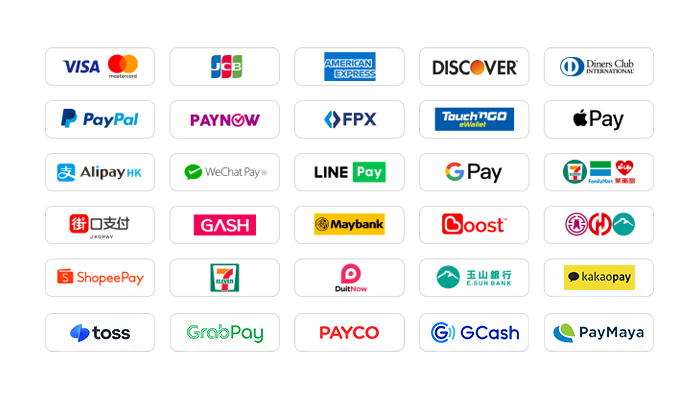
1. Credit/Debit Cards: Supports Visa, Mastercard, JCB, and other global card networks.
2. PayPal: Global third-party payment platform supporting PayPal wallet and PayPal Card.
3. Apple Pay / Google Pay: Fast biometric payments via mobile wallets.
4. Gash Wallet: Popular wallet for gamers in the region.
5. JKOPAY: Highly popular QR code payment tool.
6. LINE Pay: Supports fast payment without authentication.
7. Convenience Store Barcode: Supports payment collection at local convenience stores.
8. Convenience Store Code: Supports payment at local convenience stores.
9. Bank Transfer: Supports all local bank cards via ATM, online banking, or mobile banking.
Global Payment Methods
1. International Credit/Debit Cards: Supports Visa, Mastercard, American Express (AMEX), Discover, etc., issued worldwide.
2. PayPal: Global third-party payment platform supporting PayPal wallet and PayPal Card.
3. Apple Pay / Google Pay: Fast biometric payments via mobile wallets.
4. Hong Kong Local Payment: Supports AlipayHK and WeChat Pay HK for convenient mobile payments.
5. Malaysia Local Payment: Touch 'n Go, FPX, DuitNow, ShopeePay, etc.
6. Singapore Local Payment: PayNow supporting major Singapore banks.
7. Local Payment: Supports JKOPAY, LINEPAY, convenience store payments, bank transfers, and more.
8. Other Countries: Supports Korea (KaKaoPay, Toss, PayCo), Cambodia, Thailand (TrueMoney, LINEPAY, ShopeePay), Pakistan (Easypaisa, JAZZCASH), etc.
What Currencies Does 94LIVES Support?
94LIVES supports over 220 countries and regions. Product prices are mainly displayed in USD, with support for multiple major currencies:
Major Currencies: US Dollar (USD), Australian Dollar (AUD), Euro (EUR), British Pound (GBP), Canadian Dollar (CAD);
Asian Currencies: Hong Kong Dollar (HKD), Malaysian Ringgit (MYR), New Taiwan Dollar (TWD), Singapore Dollar (SGD);
Automatic Exchange Rate Conversion: Adjusted based on international rates during transactions.
Coverage
94LIVES serves major countries and regions worldwide, including:
Americas: United States, Canada, Brazil
Europe: UK, Germany, France, Italy, Netherlands, Switzerland, Denmark, Ireland
Asia-Pacific: Australia, Japan, South Korea, Singapore, Malaysia, New Zealand
Other Regions: South Africa, etc.
Customer Service and Support
24/7 Customer Service: Round-the-clock online support to answer questions and handle payment issues
After-sales Guarantee: A comprehensive after-sales service system ensuring a smooth recharge experience
Processing Time: Products are typically credited within 1 minute after successful payment
Recharging Fortnite through 94LIVES not only offers a convenient payment experience but also helps you avoid exchange rate losses and payment barriers. With professional service and multiple safeguard mechanisms, 94LIVES ensures you can recharge safely and efficiently, focusing on your Fortnite experience.

 Anonymous User
Anonymous User
Anonymous User
Anonymous User
Anonymous User








RM 5020, 5/F, YAU LEE CENTRE, NO.45, HOI YUEN ROAD, KWUN TONG, HONG KONG
$ 58.42