
类型
面值
Product Information
Product Name: PlayStation Network Card TR
Product Type: Game/Entertainment
Server Region: Turkey (TR PSN)
Recharge Method: Code Redemption
PSN Turkey Card Recharge Instructions
1. This product is a PlayStation Network Card (PSN Card / Gift Card / Prepaid Card), which can be used to add funds to the PlayStation Turkey Store.
2. Code Redemption method: After successful payment, the system will automatically send a redemption code. You can redeem it on your PlayStation console or the web store, and the credits will be added within 1 minute.
How to recharge PSN Turkey Card on 94LIVES? Detailed steps:
Step 1: Visit 94LIVES
Open your browser and go to the official 94LIVES website. Search for "PSN Turkey Card" or go directly to the product page.
Step 2: Choose Card Denomination
94LIVES offers a variety of PlayStation Card / Gift Card / Prepaid Card denominations: 80 TWD, 100 TWD, 200 TWD, 300 TWD, 500 TWD, 800 TWD, etc. – select as needed.
Step 3: Fill in Purchase Information
This product is a code redemption item – no account information is required. Please confirm your order and submit.
Step 4: Select Payment Method and Complete Payment
Choose the appropriate currency and payment method based on your location. 94LIVES supports multi-currency payments, and the system automatically converts at international exchange rates. After payment, the order enters processing.
Step 5: Get Code and Redeem
After successful payment, the redemption code will be immediately displayed on the order page. Copy the code and redeem it on the PlayStation Store (console or web). Credits will be added within 1 minute. Log in to your PlayStation Network account to check your wallet balance.
Delivery Method:
1. The product is a code redemption item. After successful payment, the system automatically delivers the code, which will be shown in the order details.
2. Credits will be added within 1 minute after redemption.
3. In case of system delay or order backlog, please contact 94LIVES online customer service – your order will be prioritized.
Important Notes for PSN Turkey Card Recharge
Account Security & Risk Warning
Code Protection: Do not share the redemption code with others to prevent unauthorized redemption.
Authorized Channels: Please purchase only through official platforms like 94LIVES. Unofficial channels carry risks.
Information Verification & Error Handling
Denomination Selection: Please confirm the desired denomination before purchasing.
Error Handling Mechanism: If a code is invalid due to 94LIVES platform reasons (e.g., system failure), a return can be processed after verification.
Redemption Time: If credits are not added after 1 minute, please contact 94LIVES online customer service with your order number – we will prioritize the investigation.
Minor Protection: Minors should only purchase with parental consent.
Device Compatibility: Supports PlayStation consoles and PC web redemption.
About PSN Card and PlayStation Network
PlayStation Network (PSN) is Sony's official gaming and entertainment service platform. PSN Turkey Server allows players in Turkey to purchase digital games, DLCs, membership services, and more.
PSN Card (Gift Card / Prepaid Card) is a digital voucher used to add funds to PSN Turkey accounts. After adding credits, you can spend them on the PlayStation Store and enjoy the world of games.
Main Uses of PSN Card
1. Purchase Digital Games: Use credits to buy digital games on the PS Store.
2. Subscribe to Membership: Pay for PlayStation Plus membership to enjoy online play and free games.
3. Buy DLCs: Unlock expansion packs, skins, items, and other add-ons.
4. Rent or Buy Movies: Rent or purchase movies and TV shows on the PS Store.
Platform Usage Restrictions
Applicable Scope: Only for use with PlayStation Network Turkey accounts.
Usage Restrictions: Top-up cards are valid only for redemption on the Turkey server and cannot be exchanged back or transferred across regions.
Device Compatibility: Supports PlayStation 4/5, PS Vita, and PC web redemption.
Frequently Asked Questions (FAQ)
Q1: How do I redeem the card after purchase?
A: After successful payment, find the redemption code on the order page. Then go to the PlayStation Store (console or web) and select "Redeem Code". Enter the code, and the credits will be added within 1 minute.
Q2: Can I get a return if I entered the wrong code?
A: If the code is invalid due to platform reasons, a return can be processed after verification. Please keep the code secure and enter it accurately.
Q3: How can iOS users get a better price?
A: Purchasing PSN top-up cards through 94LIVES avoids Apple in-app purchase fees, effectively saving you money.
Q4: What security precautions should I take during purchase?
A: Operate in a secure network environment, avoid public WiFi. Copy the code immediately after payment and redeem it promptly. Keep a screenshot of your order.
Q5: Is 94LIVES pricing transparent?
A: Yes, platform pricing follows market principles, including product cost, service fees, and payment channel fees – no hidden charges.
Q6: Are there discounts for large purchases?
A: Some higher denominations may have limited-time discounts – please check the product page for details.
What payment methods does 94LIVES support?
Global Payment Methods
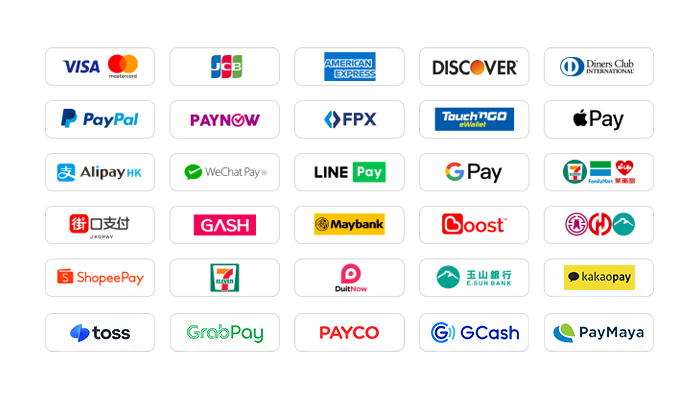
1. International Credit/Debit Cards: Supports Visa, Mastercard, American Express (AMEX), Dinner, Discover, and other global card brands.
2. PayPal: Globally accepted third-party payment platform, supporting PayPal wallet and PayPal card payments.
3. Apple Pay / Google Pay: Supports fast biometric payments via mobile wallet.
4. Turkey Local Payments: Supports AlipayTW and WeChat Pay TW for a convenient mobile payment experience.
5. Malaysia Local Payments: Touch 'n Go, FPX, DuitNow, ShopeePay, etc. TNG currently enjoys a limited-time 30% discount on processing fees.
6. Singapore Local Payments: Paynow supports major Singapore banks, with a limited-time 30% discount on processing fees.
7. Other Country Local Payments: Supports South Korea (KaKaoPay, Toss, PayCo), Cambodia, Thailand (TrueMoney, LINE Pay, ShopeePay), Pakistan (Easypaisa, JAZZCASH), and more.
The website adds/updates payment methods in real time to support more local payment options worldwide.
What currencies does 94LIVES support?
94LIVES supports over 220 countries and regions worldwide. Product prices are displayed mainly in USD, while also supporting multiple major currencies:
Major Currencies: USD, AUD, EUR, GBP, CAD.
Asian Currencies: TWD, MYR, TWD, SGD.
Automatic Currency Conversion: Exchange rates are adjusted according to international forex rates at the time of transaction; the system automatically converts to USD or your local currency for payment.
Coverage Areas
94LIVES services cover major countries and regions worldwide, including:
Americas: United States, Canada, Brazil, Mexico
Europe: United Kingdom, Germany, France, Italy, Spain, Netherlands, Switzerland, Denmark, Ireland
Asia-Pacific: Australia, Japan, South Korea, Singapore, Malaysia, New Zealand, Thailand, Vietnam, Indonesia, India
Other Regions: South Africa, UAE, etc.
Customer Support
24/7 Customer Service: Online customer service is available around the clock to answer questions and handle payment issues.
After-Sales Guarantee: A comprehensive after-sales service system ensures a smooth purchase experience. If an issue occurs due to platform reasons, a return is supported after verification.
Processing Time: Products are typically delivered within 1 minute after successful payment (code displayed instantly).
By purchasing PSN Turkey Cards through 94LIVES, you not only enjoy the official standard price but also benefit from official channel assurance and a seamless, no-wait experience. Our professional service and multi-layer protection ensure safe, efficient purchases, allowing you to fully enjoy the endless fun of the PlayStation gaming world.
rya****com

$ 36.36