


 Sales Guarantee
 Secure Assurance
 Borderless Access
Type
Value
Product Introduction
Product Name: Tencent Video
Product Type: Video/Membership Service
Server Region: Mainland China Version
Recharge Method: Official Recharge (Contact customer service after payment with your account info)
Tencent Video Membership Recharge Instructions
Membership Types: Supports recharging VIP, SVIP, Sports VIP, and Sports Super VIP for Tencent Video mainland China accounts.
Applicable Scope: This product is only applicable to Tencent Video mainland China accounts issued in the Chinese mainland region.
Manual Processing: This product requires manual recharge. After payment, please contact our online customer service and provide your Tencent Video login account (phone number/WeChat ID/QQ number). Our customer service will process it for you.
Important Note: Please try to avoid logging into your account before recharging to prevent delays or failures caused by session conflicts.
How to Recharge Tencent Video Membership on 94LIVES? Detailed Steps:
Step 1: Visit 94LIVES
Open your browser and visit the official 94LIVES website. Enter "Tencent Video Membership" in the search bar or go directly to the relevant product page.
Step 2: Select the Membership Product
Choose from VIP, SVIP, Sports VIP, or Sports Super VIP as needed, and select the corresponding validity period (e.g., 1 month, 3 months, 12 months, etc.).
Step 3: Complete Payment
Select the appropriate currency and payment method based on your region. 94LIVES supports multi-currency payments, and the system automatically converts at international exchange rates. Complete your payment.
Step 4: Contact Customer Service for Activation
After successful payment, please immediately contact 94LIVES online customer service. Provide your order number and Tencent Video login account (phone number/WeChat ID/QQ number). Customer service will submit the activation request for you.
Step 5: Confirm Membership Activation
After customer service completes the processing, the membership usually takes effect within 1-5 minutes. Please log into the Tencent Video app later and check your membership status and expiration date under "My VIP Membership."
Delivery Method:
This product is a virtual membership service. No physical card or code will be provided after purchase.
For manually processed products, after payment and contacting customer service, the recharge is usually completed within 1-5 minutes.
If there are many orders on the website causing processing delays, please contact online customer service directly, and we will prioritize your request.
Tencent Video Membership Recharge Precautions
Account Security and Risk Reminders
Account Information Protection: Customer service will only ask for your login account for activation purposes and will never request sensitive information such as passwords or verification codes.
Official Channels: Please recharge through official or authorized platforms to ensure account and service security.
Minor Protection: Minors should make purchases under the guidance of a guardian.
Information Verification and Error Handling
Information Accuracy: When contacting customer service, please ensure you provide the correct Tencent Video login account (phone number/WeChat ID/QQ number). If activation is applied to another account due to an incorrect account being provided, transfers or returns cannot be made.
Error Handling Mechanism: If the recharge fails or is incorrect due to reasons attributable to the 94LIVES platform, we can arrange a return or reactivation after verification.
About Tencent Video
Tencent Video is a leading online video media platform in China, dedicated to providing users with rich and diverse content, an ultimate viewing experience, convenient login methods, and a seamless 24-hour multi-platform application experience, meeting users' needs for watching movies, TV series, variety shows, anime, and various types of videos online.
Key Membership Privileges
Ad-Free Premium Content: Enjoy access to the VIP content library, watch paid movies, TV series, exclusive documentaries, and skip pre-roll ads.
HD & Blu-ray Quality: Members enjoy 1080P, Blu-ray, and even 4K ultra-HD quality for a clearer viewing experience.
Multi-Device Sync: Log in and use on multiple devices including phones, tablets, computers, and TVs. Membership benefits are valid across all platforms.
Live Sports Events: Sports VIP/Super VIP members can watch live broadcasts of top sports events such as NBA and UEFA Champions League, plus member-exclusive content.
Platform Usage Restrictions
Applicable Scope: This recharge is only applicable to the Tencent Video mainland China version (Chinese mainland region).
Device Compatibility: Membership benefits are supported on official clients including iOS, Android, PC, and smart TVs.
Regional Restrictions: Some content may only be viewable in specific regions due to copyright restrictions.
Frequently Asked Questions (FAQ)
Q1: What should I do if the membership is not activated after recharging?
A: Please confirm that you have contacted customer service and provided your account. Then check your network, log out of the Tencent Video app, log back in, and check under "My VIP Membership." If it still hasn't taken effect, please contact 94LIVES online customer service to inquire about the processing status.
Q2: Can I get a return if I entered the wrong login account?
A: If we have already completed the recharge based on the incorrect account information you provided, it cannot be transferred or returned. Please double-check carefully. If the recharge error is caused by the 94LIVES platform, we will take responsibility for handling it after verification.
Q3: How can I find out my Tencent Video login account?
A: Open the Tencent Video app and go to the "My" page. The phone number, WeChat ID, or QQ number displayed next to your avatar is your login account. You can also check under "Settings" -> "Account & Security."
Q4: How many devices can I use my membership on?
A: Tencent Video VIP/SVIP allows login on up to 5 devices, but videos can be watched on a maximum of 2 devices simultaneously. For specific rules, please refer to the latest official Tencent Video policy.
Q5: How is the recharge pricing determined on 94LIVES?
A: 94LIVES platform product pricing follows market principles and relevant laws and regulations. The final price consists of product cost, platform services, payment channel fees, and operational costs. Pricing is open and transparent.
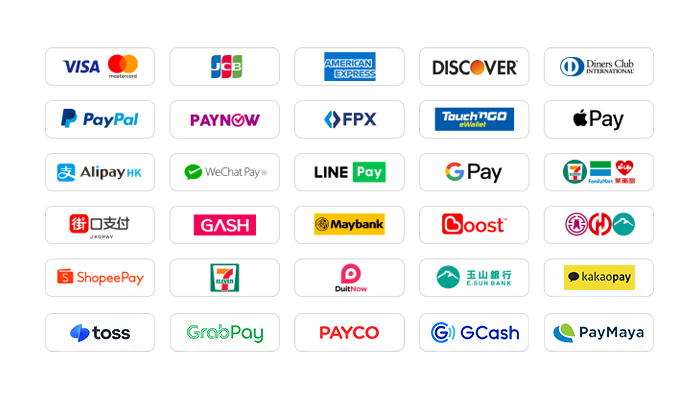
What Payment Methods Does 94LIVES Support?
Global Payment Methods
International Credit/Store Value Cards: Supports globally issued cards from Visa, Mastercard, American Express (AMEX), and other card groups.
PayPal: Globally recognized third-party payment platform.
Apple Pay / Google Pay: Supports fast payments via mobile wallets.
Regional E-Wallets: Supports Hong Kong AlipayHK, WeChat Pay HK; Malaysia Touch 'n Go, Boost; Thailand TrueMoney, and many other regional wallets.
Online Banking Transfer: Supports local bank online transfers in multiple countries.
The website regularly adds/updates payment methods to support more countries' local payments.
What Currencies Does 94LIVES Support?
94LIVES supports over 220 countries and regions worldwide. Product prices are primarily displayed in USD, while also supporting multiple mainstream currencies:
Major Currencies: US Dollar (USD), Australian Dollar (AUD), Euro (EUR), British Pound (GBP), Canadian Dollar (CAD).
Asian Currencies: Hong Kong Dollar (HKD), Malaysian Ringgit (MYR), New Taiwan Dollar (TWD), Singapore Dollar (SGD).
Automatic Exchange Rate Conversion: Exchange rates are automatically adjusted according to international exchange rates during transactions, and the system automatically converts to USD or local currency for payment.
Coverage Regions
94LIVES services cover major countries and regions worldwide, including:
Americas: United States, Canada, Brazil
Europe: United Kingdom, Germany, France, Italy, Netherlands, Switzerland
Asia Pacific: Australia, Japan, South Korea, Singapore, Malaysia
Customer Service & Support
24/7 Customer Service: Round-the-clock online customer service to answer user questions and handle payment and activation issues.
After-sales Guarantee: Comprehensive after-sales service system to ensure a smooth activation experience for users.
Processing Time: After payment and contacting customer service, orders are usually processed within 1-5 minutes.
By recharging your Tencent Video membership through 94LIVES, you can enjoy convenient global payments, transparent exchange rate conversions, and professional customer support, easily unlocking a vast library of premium video content and sports events for an ad-free, high-definition audio-visual feast.

 a17****.tw
jim****com
whi****com
a17****.tw
jim****com
whi****com









RM 5020, 5/F, YAU LEE CENTRE, NO.45, HOI YUEN ROAD, KWUN TONG, HONG KONG
$ 42.13