


 售后保障
售后保障
 官方充值
官方充值
 交易安全
交易安全
类型
面值
Product Introduction
Product Name: Douyin DOU+
Product Type: Live Streaming/Video/Social
Server Region: CN Version/Mainland China Version/CN Server
Recharge Method: Douyin Official Top-up (Only Douyin ID required)
Douyin Top-up Instructions
1. Android Users: 1 RMB = 10 DOU+ (Official standard ratio);
2. iOS Users: Due to Apple App Store charging a 30% service fee, the ratio is approximately 1 RMB = 7 DOU+;
3. 94LIVES Top-up: All users can enjoy the standard 1:10 ratio. It is recommended for iOS users to top up through 94LIVES to save costs. Only a Douyin ID is needed (if your Douyin ID is purely numeric, it is recommended to change it to a combination of letters and numbers, e.g., w3333333). After payment is completed, the system will automatically complete the top-up service for you.
How to Change Your Douyin ID?
1. Open the Douyin app, log in, and tap "Me";
2. Then tap "Edit Profile";
3. Then tap "Douyin ID";
4. In the "My Douyin ID" field, add any English characters;
5. Finally, tap "Save" in the top right corner to successfully change your Douyin ID.
How to Differentiate Between Douyin CN Version and International Version?
TikTok: Commonly known as the overseas version or international version of Douyin, focused on short video services abroad. Login methods mainly include email, Facebook, Twitter accounts, etc. The official top-up item is Coins ($0.99 USD = 70 Coins);
Douyin: The CN version of Douyin, focused on domestic short video services. Login methods mainly include phone number, WeChat, QQ, Toutiao account, etc. The official top-up item is DOU+ (1 RMB = 10 DOU+).
How to Top up Douyin DOU+ on 94LIVES? Detailed Steps:
Step 1: Visit 94LIVES
Open your browser and go to the official 94LIVES website. Search for "Douyin DOU+ Top-up" or directly enter the relevant product page.
Step 2: Select Top-up Product
94LIVES offers various DOU+ denominations, such as: 1000 DOU+, 3000 DOU+, 5000 DOU+, 10000 DOU+, etc.
Step 3: Fill in Recharge Information
Enter your Douyin ID and confirm the account information is accurate.
Step 4: Choose Payment Method & Complete Payment
Select the appropriate currency and payment method based on your region. 94LIVES supports multi-currency payments, and the system automatically converts at the international exchange rate. The order enters processing after payment is completed.
Step 5: Confirm Top-up Arrival
Once the order shows as completed, the top-up usually arrives within 1-2 minutes. Log into the Douyin app to check your DOU+ balance and confirm the arrival.
Delivery Method:
1. After successful payment, the top-up will arrive within 1-2 minutes.
2. Your order will be processed immediately after contacting customer service, typically completed within 1 minute.
3. If your order is delayed due to a high volume of orders, please contact online customer service directly for priority handling.
Douyin Top-up Precautions
Account Security & Risk Warnings
Account Information Protection: All official top-up channels will never ask for unnecessary information. Stop immediately if such requests are made.
Real-name Authentication Requirement: Ensure your Douyin account has completed real-name authentication, otherwise it may affect the top-up process.
Third-Party Risks: There are certain risks involved, including platform controls and regulatory penalties, which you must bear yourself.
Information Verification & Error Handling
Information Accuracy: Carefully check the top-up account information to avoid top-up failure due to incorrect entries.
Error Handling Mechanism: If a top-up error occurs due to a 94LIVES platform issue, a return can be processed after verification.
Delivery Time: If delivery is abnormal due to a high volume of orders, contact online customer service directly for priority handling.
About Douyin and DOU+
Douyin is a short video social platform under ByteDance, launched in China in September 2016. With the core concept of "Recording a Beautiful Life," the platform provides users with a comprehensive experience of content creation, sharing, and social interaction through short videos ranging from 15 seconds to 10 minutes.
DOU+ (also known as "Doujia") is a content heating and marketing promotion tool officially launched by Douyin. By paying, users can recommend their videos or live streams to more potential interested users, thereby increasing exposure, interaction, and conversion.
Main Uses of DOU+
DOU+ mainly serves two types of users: ordinary content creators (content heating) and businesses/marketing users (marketing promotion).
1. Content Heating (Applicable to all users)
Boost Video Data: Purchase traffic for published videos to increase views, likes, comments, shares, and profile visits.
Boost Live Streams: Heat up live streams to increase audience count, viewer entry rate, and interaction heat, helping to solve cold start problems.
Increase Followers: Set "Increase Followers" as the goal to recommend your video to users who are more likely to follow you.
Support Others: You can not only heat up your own content but also invest DOU+ in others' videos or live streams.
2. Marketing Promotion (Requires account upgrade and qualification certification)
For enterprises and self-employed individuals, DOU+ unlocks more powerful business conversion capabilities:
Native Interaction: Increase overall account exposure, drive traffic to live streams, used for account cultivation and follower accumulation.
Local Promotion (POI): Promote physical stores, supporting targeted advertising to users within 6-15 km to attract customers to the store.
Lead Collection: Embed contact numbers, private message components, or landing pages in videos to efficiently collect potential customer information.
E-commerce Traffic Redirect: One-click jump to third-party e-commerce platforms such as Taobao and JD.com, shortening the shopping path and improving product sales conversion.
3. How to Use DOU+
Entry Point: On the Douyin video playback page, tap the "..." share button in the bottom right corner, and find "DOU+ for Trending" or "Heat Up Video" in the menu to enter.
Campaign Settings: You can choose "Quick Promote Mode" (system intelligent recommendation) or "Targeted Mode" (customize audience gender, age, region, interest tags, etc.), and set the campaign duration and budget.
Notes: Video content must comply with community guidelines; generally, content older than 3 months cannot be heated; campaign effectiveness is affected by factors such as video quality and targeting accuracy.
Platform Usage Restrictions
Applicable Scope: This top-up is only applicable to the CN version of Douyin DOU+ top-ups, not the overseas version TikTok.
Device Compatibility: Supports Apple (iOS) and Android systems.
Frequently Asked Questions (FAQ)
Q1: What should I do if DOU+ is not credited after top-up?
A: First, check your network connection, then restart the Douyin app and check your transaction history. If it still hasn't arrived, contact 94LIVES online customer service or wait 24 hours before checking again.
Q2: Can I get a refund if I entered the wrong top-up account?
A: If a top-up error occurs due to a platform issue, a return can be processed after verification. Carefully check the top-up account information to avoid top-up failure due to incorrect entries.
Q3: How can iOS users get the 1:10 top-up ratio?
A: By topping up Douyin through 94LIVES, you can enjoy the 1:10 DOU+ ratio. All 94LIVES users can enjoy the standard 1:10 ratio, avoiding the impact of the Apple tax.
Q4: What safety precautions should I take during the top-up process?
A: Ensure you operate in a secure network environment and avoid using public WiFi; double-check your Douyin ID and linked phone number before payment; keep transaction receipt screenshots for future inquiries.
Q5: How is the top-up pricing on 94LIVES determined?
A: Product pricing on the 94LIVES platform follows market principles. The final selling price consists of product cost, platform service fees, payment channel fees, taxes, and other components, ensuring transparent and reasonable pricing.
What Payment Methods Does 94LIVES Support?
Global Payment Methods
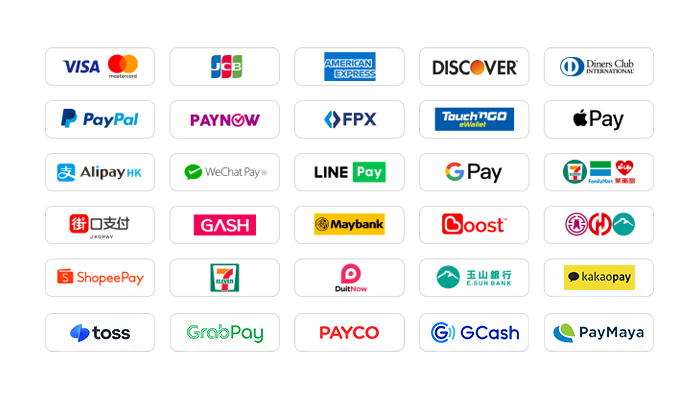
1. International Credit/Debit Cards: Supports credit cards or debit cards issued by global card networks such as Visa, Mastercard, American Express (AMEX), Diners Club, Discover, etc.
2. PayPal: A globally accepted third-party payment platform supporting PayPal wallet and PayPal card payments.
3. Apple Pay / Google Pay: Supports quick biometric payments via mobile wallets.
4. Hong Kong Local Payments: Supports AlipayHK and WeChat Pay HK for convenient mobile payment experiences.
5. Malaysia Local Payments: Touch 'n Go, FPX, DuitNow, ShopeePay, etc. Current website promotion offers a 30% discount on TNG transaction fees for a limited time.
6. Singapore Local Payments: Paynow supports major Singapore banks. Current website promotion offers a 30% discount on transaction fees for a limited time.
7. Other Countries Local Payments: Supports South Korea (KaKaoPay, Toss, PayCo), Cambodia, Thailand (TrueMoney, LINEPAY, ShopeePay), Pakistan (Easypaisa, JAZZCASH), etc.
The website regularly adds/updates payment methods to support more countries' local payments.
Which Currencies Does 94LIVES Support?
94LIVES supports over 220 countries and regions worldwide. Product prices are mainly displayed in USD, while also supporting multiple major currencies:
Major Currencies: US Dollar (USD), Australian Dollar (AUD), Euro (EUR), British Pound (GBP), Canadian Dollar (CAD);
Asian Currencies: Hong Kong Dollar (HKD), Malaysian Ringgit (MYR), New Taiwan Dollar (TWD), Singapore Dollar (SGD);
Automatic Exchange Rate Conversion: Exchange rates are automatically adjusted according to international exchange rates during transactions, and the system automatically converts to USD or local currency for payment.
Coverage Areas
94LIVES services cover major countries and regions worldwide, including:
Americas: United States, Canada, Brazil
Europe: United Kingdom, Germany, France, Italy, Netherlands, Switzerland, Denmark, Ireland
Asia-Pacific: Australia, Japan, South Korea, Singapore, Malaysia, New Zealand
Other Regions: South Africa, etc.
Customer Service & Support
24/7 Customer Service: Around-the-clock online customer service to answer user questions and handle payment issues.
After-sales Guarantee: A comprehensive after-sales service system ensures a smooth top-up experience for users.
Processing Time: Products are usually topped up within 1-2 minutes after successful payment.
By topping up Douyin DOU+ through 94LIVES, users can enjoy a convenient payment experience while avoiding exchange rate losses and payment barriers. The platform's professional service and multiple safeguard mechanisms ensure that users can complete top-up operations safely and efficiently, focusing on the interactive and entertainment experience of the Douyin platform.

 Anonymous User
joh****com
Anonymous User
Anonymous User
joh****com
Anonymous User









RM 5020, 5/F, YAU LEE CENTRE, NO.45, HOI YUEN ROAD, KWUN TONG, HONG KONG
$ 163.78