


 Sales Guarantee
 Secure Assurance
 Borderless Access
Type
Value
Product introduction
Product name: Yuyin APP (Fishball Planet)
Product Type: Live Broadcast/Voice
Product area service: Mainland China
Recharge method: Fishyin APP (Fishball Planet) ID direct recharge
Yuyin APP (Yuwan Planet) Recharge Instructions
1. Android users: 10 yuan = 100 shells (official standard ratio);
2. Apple iOS users: Since the Apple App Store charges a 30% service fee, the ratio is approximately 10 yuan = 70 shells;
3. 94LIVES recharge: All users can enjoy the standard ratio of 1:1. It is recommended that Apple users recharge through 94LIVES to save costs.
4. To recharge on the official website of Yuyin APP (Yuwan Planet), you need to fill in the account ID , manual one-on-one service, 24-hour customer service online processing orders.
How to recharge Yuyin APP (Fish Ball Planet) shells on 94LIVES? The detailed steps are as follows:
Step One: Visit 94LIVES
Open the browser to visit the 94LIVES official website and enter in the search bar“ Yuyin APP (Fishball Planet) recharge”Or go directly to the relevant product page;
Step 2: Select recharge products
94LIVES provides a variety of gold coin denomination options: such as 100 shells, 500 shells, 1000 shells, etc.;
Step 3: Fill in the recharge information
Enter your Yuyin APP (Yuwan Planet) account ID and confirm that the recharge account information is accurate;
Important note: Please do not access Yuyin APP (Yuwan Planet) before the transaction is completed to avoid recharge failure due to the wrong number.
Step 4: Select payment method and complete payment
Choose the appropriate currency and payment method according to your region. 94LIVES supports payment in all currencies. The system automatically converts according to the international exchange rate. After the payment is completed, the order enters the processing process.;
Step 5: Confirm the recharge is received
After the recharge product is successfully paid, you need to contact online customer service for assistance. The recharge is usually completed within 1-2 minutes, and then the gold coin balance can be checked to confirm the arrival status.
Receipt method:
1. After the product is successfully paid, it will arrive in your account within 1-2 minutes.;
2. Your order will be processed immediately after contacting customer service, and the recharge is usually completed within 1 minute.;
3. If there are too many orders on the website and the delivery speed of your order is abnormal, please contact online customer service directly and we will give priority to you.
Precautions for recharging Yuyin APP (Yuwan Planet)
Account security and risk tips
Account information protection: All official recharge portals will not ask for non-essential information. If you encounter such a request, please stop operating immediately.;
Real-name authentication requirements: Make sure that the Yuyin APP (Yumu Planet) account has completed real-name authentication, otherwise it may affect the recharge process.;
There are certain risks in informal channels or private stored value, including game control and rules and penalties, so you need to pay more attention to them.;
Information verification and error handling
Information accuracy: Carefully check the information related to the recharge account to avoid filling in the recharge information incorrectly.;
Error handling mechanism: If there is a recharge error due to the 94LIVES platform, it can be refunded after verification.;
Arrival time: If there are too many orders on the website and the delivery speed is abnormal, you can directly contact the online customer service for priority processing.;
Introduction to Yuyin APP (Fishball Planet) and Shell
YuYin is a voice + music + stranger social app developed by Chengdu Yiqing Technology. It focuses on multi-person voice rooms, singing, mic matching, and heartbeat matching. It is targeted at young users and adopts a paid reward + membership model.
Yuyin APP (Fish Ball Planet) Shell It is a virtual currency officially issued by Yuyin APP (Yuwan Planet) and is mainly used for virtual consumption scenarios within the platform.
Main uses of shells
1. Voice room tipping and song requesting (most commonly used): Send virtual gifts (roses, cakes, sports cars, airplanes, etc.) to anchors/users who use the microphone. The higher the value of the gift, the higher the income of the anchor.;
2. 1v1 Heartbeat Matching/Lianmai: Initiate/unlock anonymous voice speed matching, consume shells by minute/number of times;
3. Personal decoration and privileges: purchase personalized props such as avatar frames, entrance cars, bubbles, business card backgrounds, etc.;
4. Private messages and dynamic interactions
Unlock paid private messages and send paid emoticons/red envelopes
5. Other paid functions
Participate in platform draws, activities, and auctions
Platform usage restrictions
Scope of application: This recharge is applicable to the shell recharge of Yuyin APP (Fishball Planet) in mainland China;
Usage restrictions: Shells can only be used to purchase virtual items within the platform and cannot be used for e-commerce shopping.;
Device compatibility: supports Apple system (iOS) and Android system (Android);
Frequently Asked Questions (FAQ)
Q1: What should I do if the shells of Yuyin APP (Fishball Planet) do not arrive in my account after recharging?
A: First check the network connection, then restart the Yuyin APP (Yuwan Planet) APP and check the transaction records. If it still shows that the account has not been received, you can contact 94LIVES online customer service to handle it, or wait 24 hours before confirming.
Q2: Can I get a refund if I fill in the wrong recharge account number?
A: Carefully check the recharge information provided to avoid incorrect information that may result in the recharge not being credited. Only recharge errors caused by platform reasons can be refunded after verification.
Q3: How can Apple users obtain a 1:1 recharge ratio?
A: You can enjoy shells by recharging Yuyin APP (Fishball Planet) through 94LIVES 1:1ratio, all users of 94LIVES can enjoy the standard ratio of 1:1 to avoid the impact of Apple tax.
Q4: What safety matters need to be paid attention to during the recharge process?
A: Make sure to operate in a safe network environment and avoid using public WiFi; Confirm the Yuyin APP (Fishball Planet) ID twice before payment ; Keep screenshots of transaction vouchers for future reference.
Q5: How is the recharge pricing of 94LIVES determined?
A: The pricing of products on the 94LIVES platform follows market principles. The final sales price is composed of product cost, platform service fees, payment channel fees, taxes, etc. The pricing is transparent and reasonable.
Q6: Are there any discounts for large recharges?
A: Yes, extra shells will usually be given for large recharges. The details are shown on the recharge page.
What payment methods does 94LIVES support?
94LIVES is very friendly to Taiwanese users and covers almost all local mainstream non-cash payment methods:
Local payment methods in Taiwan
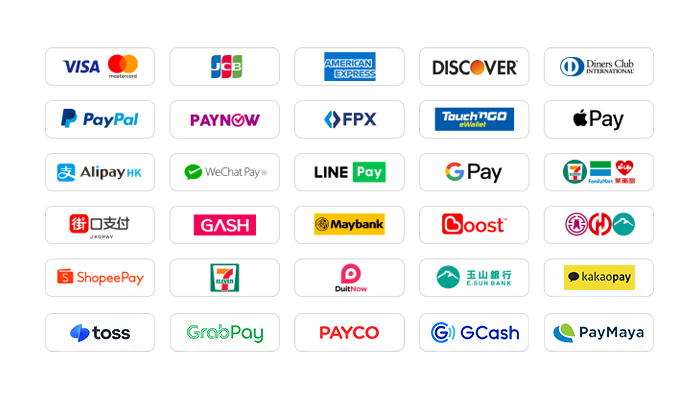
1. Credit card/debit card: supports credit cards or debit cards issued by global card groups such as Visa, Mastercard, and JCB.
2. PayPal: A global third-party payment platform that supports PayPal wallet and PayPal card payments.
3.Apple Pay/Google Pay: Supports fast biometric payments through mobile wallets.
4. Gash member wallet: supports the Gash wallet commonly used by local game players in Taiwan.
5. Jiekou Payment (JKOPAY): Taiwan’s most popular scan-code payment tool, you can now enjoy a 20% discount on website activity fees for a limited time.
6. LINE Pay: The current website supports fast payment without authentication, and you can enjoy a 50% discount on handling fees for a limited time.
7. Supermarket barcode: Support collection and payment through convenience stores such as 7-11, FAMIPORT, Life-ET, etc.
8. Supermarket code: The current website supports authentication-free and fast payment, and supports collection and payment at the four major convenience stores in Taiwan.
9. Bank transfer and Yushan Bank: Supports all financial cards of banks in Taiwan. Direct transfer payment in New Taiwan Dollars through physical ATM machines, online banking or mobile banking.
Global payment methods
1. International credit cards/stored-value cards: supports credit cards or debit cards issued by Visa, Mastercard, American Express (AMEX), Dinner, Discover and other card groups around the world.
2. PayPal: A global third-party payment platform that supports PayPal wallet and PayPal card payments.
3. Apple Pay/Google Pay: Supports fast biometric payments through mobile wallets.
4. Local payment in Hong Kong: Supports AlipayHK and WeChat Pay HK, and can directly use mobile payment to complete a convenient payment experience.
5. Local payment in Malaysia: Touch 'n Go, FPX, DuitNow, ShopeePay, etc. TNG on the current website can enjoy a 30% discount on handling fees for a limited time.
6. Local payment in Singapore: Paynow supports major banks in Singapore, and now enjoys a 30% discount on website activity fees for a limited time.
7. Local payment in Taiwan: Supports local mainstream wallet payments such as JKOPAY, LINEPAY, supermarkets, bank transfers, etc., and some payment methods have limited-time discounts on handling fees.
8. Local in other countries: Support South Korea (KaKaoPay, Toss, PayCo), Cambodia, Thailand (TrueMoney, LINEPAY, ShopeePay), Pakistan (Easypaisa, JAZZCASH), etc.
The website will add/update payment methods in real time to support local payments in more countries.
What currencies does 94LIVES support?
94LIVES supports more than 220 countries and regions around the world. Product display prices are mainly in US dollars, and it also supports multiple mainstream currencies:
Major currencies: US dollar (USD), Australian dollar (AUD), euro (EUR), British pound (GBP), Canadian dollar (CAD);
Asian currencies: Hong Kong dollar (HKD), Malaysian ringgit (MYR), New Taiwan dollar (TWD), Singapore dollar (SGD);
Automatic exchange rate conversion: The exchange rate is automatically adjusted according to the international exchange rate during the transaction, and the system automatically converts it into US dollars or local currency for payment.;
Coverage area
94LIVES services cover major countries and regions around the world, including:
Americas: United States, Canada, Brazil
Europe: United Kingdom, Germany, France, Italy, Netherlands, Switzerland, Denmark, Ireland
Asia Pacific: Australia, Japan, South Korea, Singapore, Malaysia, New Zealand
Other regions: South Africa, etc.
Customer service and support
7x24 hour customer service: 24/7 online customer service to answer users’ questions and handle payment issues
After-sales guarantee: Complete after-sales service system to ensure user recharge experience
Processing time: The goods are usually recharged within 1-2 minutes after successful payment.
By recharging the Yuyin APP (Fishball Planet) shells on 94LIVES, users can not only enjoy a convenient payment experience, but also avoid exchange rate losses and payment obstacles. The platform's professional services and multiple guarantee mechanisms ensure that users can complete recharge operations safely and efficiently, focusing on the interaction and entertainment experience of the Yuyin APP (Yuwan Planet) platform.

 Anonymous User
Anonymous User
Anonymous User
Anonymous User
Anonymous User








RM 5020, 5/F, YAU LEE CENTRE, NO.45, HOI YUEN ROAD, KWUN TONG, HONG KONG
$ 815.22