


 Sales Guarantee
 Secure Assurance
 Borderless Access
Type
Value
Product Introduction
Product Name: Mufy
Product Type: AI Application
Product Content: Membership
Recharge Method: Official Website Recharge (Contact Customer Service After Payment)
Mufy Recharge Instructions
1. This product is for recharging Rations and Membership services within the Mufy app, processed through the official account
2. Please fill in your account information accurately when placing the order, ensuring the account can log in normally
3. After completing payment, please contact online customer service for assistance with the recharge process
4. The recharge is processed through the official system interface, guaranteeing stable and reliable delivery
Detailed Steps to Recharge Mufy on 94LIVES:
Step 1: Visit 94LIVES
Open a browser and visit the official 94LIVES website. Search for "Mufy" in the search bar or go directly to the corresponding product page
Step 2: Select Recharge Content
Choose the Rations or Membership recharge option based on your needs
Step 3: Fill in Recharge Information
Enter your Mufy account and carefully verify the account information to ensure accuracy
Important: Please carefully verify your account information to avoid issues with the recharge process due to incorrect account details
Step 4: Choose a Payment Method and Complete Payment
Select the appropriate currency and payment method based on your region. After completing payment, the order enters the processing flow
Step 5: Contact Customer Service to Complete Recharge
After successful payment, contact online customer service. The customer service team will assist in completing the recharge operation, which will be credited within 1 minute
Delivery Method:
1. After successful payment and contacting customer service, the credit will be completed within 1-10 minutes
2. Customer service will process your recharge immediately upon receiving the order information
3. Once credited, you can log into the app to view the corresponding content
Recharge Precautions
Account Security and Risk Warnings
Please perform recharge operations in a secure network environment and protect your personal account information
Ensure your account status is normal, with no bans or unusual restrictions, to avoid affecting the recharge
Only recharge through the official 94LIVES channel to ensure account and transaction security
Information Verification and Error Handling
Be sure to verify your account before submitting the order to avoid filling in incorrect information
If a recharge anomaly occurs due to platform reasons, it can be addressed upon verification
If you encounter any problems during the recharge process, feel free to contact online customer service for assistance
Minor Protection
Minors must perform recharge operations with the consent and accompaniment of a guardian
Please manage your spending wisely and recharge responsibly
Mufy Product Description
Mufy is a versatile application where users can enjoy diverse content experiences, exclusive services, and interactive gameplay
Rations are important in-app consumables, and Membership provides exclusive services and advanced experiences, helping users make better use of the app's features
Main Uses
1. Rations: Used to unlock featured content within the app, experience exclusive functions, and participate in various platform activities
2. Membership: Unlock exclusive member benefits, advanced services, priority trial qualifications, and exclusive perks to enhance the user experience
3. Participate in various in-app interactions and unique gameplay features, unlocking more usage scenarios and exclusive content
4. Enjoy a smoother and more convenient user experience and obtain exclusive service support
Platform Restrictions
Compatible Devices: Supports iOS and Android devices
Applicable Accounts: Suitable for official Mufy app accounts
Usage Rules: Recharged content can only be used within the corresponding app and is limited to the user's own account
Frequently Asked Questions (FAQ)
Q1: What should I do if the recharge doesn't arrive in time?
A: Please contact online customer service promptly after payment. The customer service team will handle it immediately. Under normal circumstances, it will be credited within 1 minute. If it hasn't shown up, try restarting the app to check.
Q2: What if I entered the wrong account?
A: Please ensure you fill in the account information accurately to avoid issues with the recharge process due to incorrect account details.
Q3: Does the recharge support all device systems?
A: Yes, it supports both Apple iOS and Android devices. Recharge and delivery work normally on both systems.
Q4: How do I use the benefits after the Membership is credited?
A: After the recharge is credited, log into the app and go to the Membership Center to view and use all exclusive benefits and services.
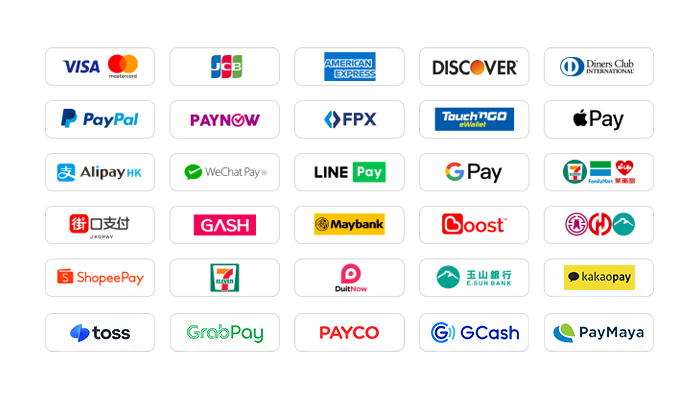
What Payment Methods Does 94LIVES Support?
94LIVES is very friendly towards Taiwanese users, covering almost all mainstream local non-cash payment methods
Global Payment Methods
1. International Credit/Prepaid Cards: Supports credit cards or debit cards issued by global card networks including Visa, Mastercard, American Express (AMEX), Diners, Discover, etc.
2. PayPal: A globally accepted third-party payment platform, supporting PayPal wallet and PayPal card payments
3. Apple Pay / Google Pay: Supports quick biometric payments via mobile wallets
4. Hong Kong Local Payment: Supports AlipayHK and WeChat Pay HK, allowing for a convenient payment experience directly via mobile phone
5. Malaysia Local Payment: Touch 'n Go, FPX, DuitNow, ShopeePay, etc. The website currently offers a limited-time 30% discount on transaction fees for TNG
6. Singapore Local Payment: Paynow supports major Singaporean banks. The website currently offers a limited-time 30% discount on transaction fees
7. Other Countries' Local Methods: Supports South Korea (KaKaoPay, Toss, PayCo), Cambodia, Thailand (TrueMoney, LINEPAY, ShopeePay), Pakistan (Easypaisa, JAZZCASH), etc.
The website continuously adds/updates payment methods to support more countries' local payments
What Currencies Does 94LIVES Support?
94LIVES supports over 220 countries and regions worldwide. Product prices are primarily displayed in USD, while also supporting multiple major currencies
Major Currencies: US Dollar (USD), Australian Dollar (AUD), Euro (EUR), British Pound (GBP), Canadian Dollar (CAD)
Asian Currencies: Hong Kong Dollar (HKD), Malaysian Ringgit (MYR), New Taiwan Dollar (TWD), Singapore Dollar (SGD)
Automatic Currency Conversion: Exchange rates are automatically adjusted according to international interbank rates. The system automatically converts to USD or local currency for payment
Coverage Area
94LIVES services cover major countries and regions globally, including:
Americas: United States, Canada, Brazil
Europe: United Kingdom, Germany, France, Italy, Netherlands, Switzerland, Denmark, Ireland
Asia Pacific: Australia, Japan, South Korea, Singapore, Malaysia, New Zealand
Other Regions: South Africa, etc.
Customer Service & Support
24/7 Customer Service: Around-the-clock online customer service to answer questions and handle payment issues
After-sales Guarantee: A comprehensive after-sales service system ensures a positive user recharge experience
Processing Time: Products are typically credited within 1-10 minutes after successful payment
By recharging Mufy Rations and Membership through 94LIVES, users can enjoy a convenient payment experience and fast crediting service. The platform's professional services and multiple security mechanisms ensure that users can complete their recharge operations safely and efficiently, focusing on the various experiences within the app.

 Anonymous User
Anonymous User
Anonymous User
Anonymous User
Anonymous User









RM 5020, 5/F, YAU LEE CENTRE, NO.45, HOI YUEN ROAD, KWUN TONG, HONG KONG
$ 6.83